Input is the hard part
A task manager is only as good as the tasks that make it in. Every extra tap between a thought and a saved task is a task that never gets saved. Here, capture is one tap and a sentence; the AI does the structuring — title, deadline, time, repeat — so there is no form to fill.
What the AI planner does with a capture
- Splits multiple tasks from one sentence
- Reads deadlines and times from natural language
- Recognizes recurrence — "every Monday", "daily"
- Creates reminders for anything with a time
- Keeps context and ideas out of the task list, in Notes and Ideas
Today: your day as a timeline
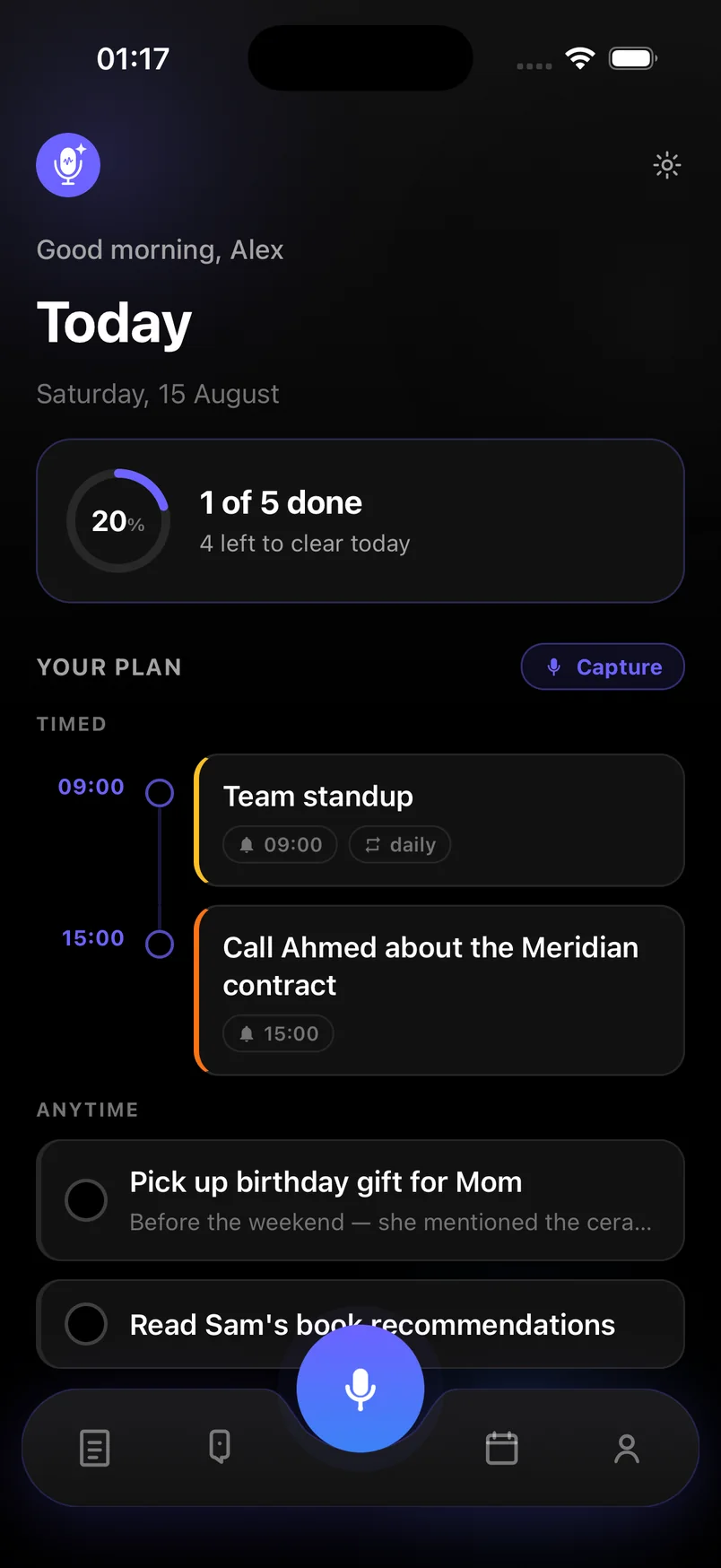
The Today screen is the planner view. Timed tasks sit on an hour-by-hour timeline; undated ones wait under Anytime. A progress ring shows how much of the day is cleared. One tap marks something done, and recurring items come back on schedule.
Because the whole plan syncs across devices, the task you spoke into your phone in the morning is on your tablet in the afternoon.
Deliberately simple
This is not a project-management suite. There are no boards, sprints or team assignments. It is a personal AI task manager for people who want to get things out of their head fast and see a clear day — with the AI handling the structure they would otherwise skip.
Frequently asked questions
Can the AI task manager plan my whole day?
It arranges timed tasks on the Today timeline and lists the rest under Anytime. It does not auto-schedule undated tasks into time slots; you decide when those happen.
Does it integrate with my calendar?
Not in the current version. Tasks and reminders live in the app and notify you through system notifications.
Is there a free plan?
Yes. Capture, Today, reminders and search are free, with 20 AI captures a month. Premium is unlimited with a 7-day free trial.