Reminders without the form
Setting a reminder in most apps is a small form: title, date, time, repeat. Speaking it is a sentence. The AI reads the sentence, finds the when and the how often, and creates the reminder. If you did not say a time, it becomes an anytime task instead of a badly-timed alarm.
Recurring reminders that stick
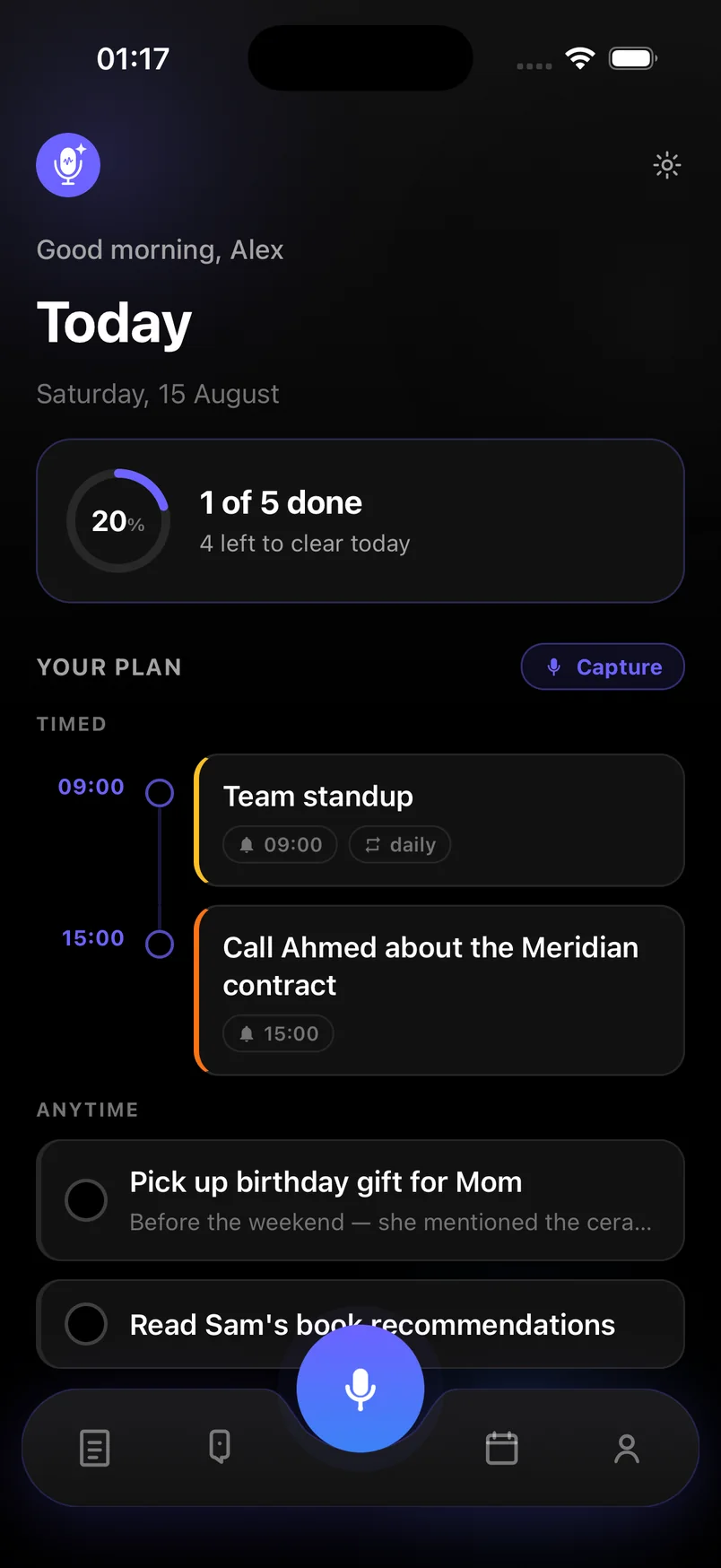
Say "every Monday", "daily" or "every weekday" and the reminder repeats on that schedule. The Today screen shows recurring items with a repeat badge so you can see at a glance which ones come back. Snooze or mark done from the notification.
- One-off and recurring reminders from natural speech
- Notifications with Done and Snooze actions
- Timed reminders on the Today timeline
- Reminders and tasks in one place — no separate alarms app
- Synced across your devices
Reminders that come from bigger thoughts
Reminders rarely arrive alone. After a call you might say "send the proposal by Wednesday, and remind me to follow up Friday if they have not replied". That is a task with a deadline plus a reminder, from one voice note. The AI keeps both, correctly dated.
Frequently asked questions
Do voice reminders work when the app is closed?
Yes. Reminders are scheduled as system notifications and fire whether or not the app is open, as long as notifications are allowed for the app.
Can I set location-based reminders?
Not yet. Reminders are time-based. You can still capture "when I get to the office" as a task; it will appear in your Anytime list.
Are recurring reminders free?
Yes. Reminders, including recurring ones, are part of the free plan. AI extraction is limited to 20 captures a month on free.