Why voice is faster for to-do lists
Typing a task means opening an app, creating an item, typing the text, tapping a date field, choosing a day, setting a time, and saving. Speaking it is one tap and one sentence. When the AI understands "Thursday" and "tomorrow morning", the date picker disappears entirely.
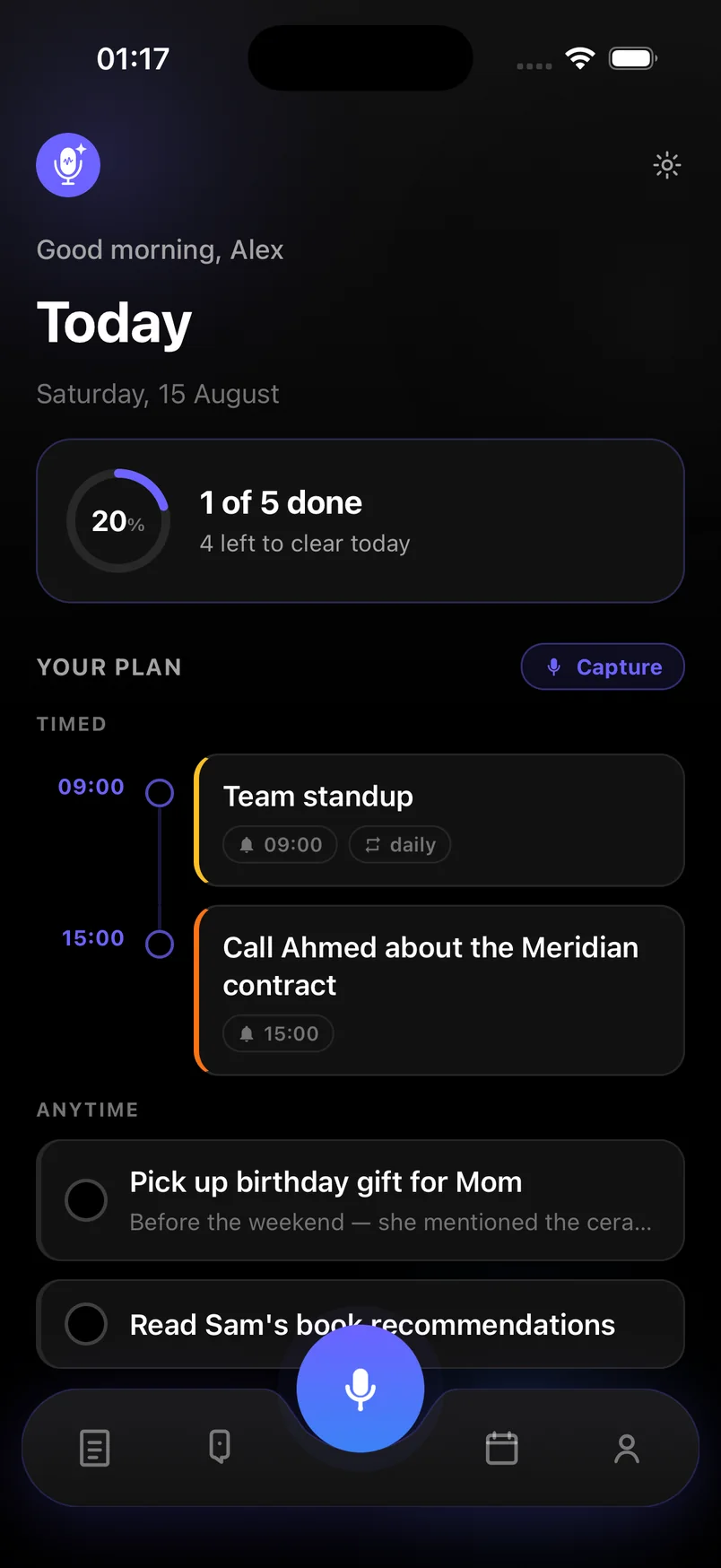
Voice notes & Smart plan is built around that. You speak, the AI extracts each task and its timing, and the Today screen lays them out as a timeline: timed items on the hour they are due, everything else in an Anytime list below.
What the AI understands
Natural phrasing for time and repetition, without special commands:
- Days and dates — "Friday", "the 15th", "next week"
- Times — "at 9", "after lunch", "tonight"
- Recurrence — "every Monday", "daily standup"
- Multiple tasks in one breath — each becomes its own item
- Context that is not a task — kept as a note instead of cluttering the list
Marking done and staying on track
Today shows how much of the day is cleared and what is left. Tap a task to mark it done. Reminders fire at the time you said, and recurring ones come back on their own. Everything syncs across your devices, so the list you spoke into your phone is the list you see later.
Frequently asked questions
Can I add tasks to my to-do list by voice while driving?
You can start a capture with one tap and speak hands-free while recording. Follow local law and keep your attention on the road.
Does it set reminders automatically?
Yes. When a task has a time, a reminder is created for it. You can adjust or remove the reminder afterwards.
Can I type tasks too?
Yes. Capture has a Speak mode and a Type mode. The AI extraction works the same on both.